Saudi Urban Intelligence Studio

Saudi Urban Intelligence StudioUrbanGPT.AISpecialized Editions

UrbanGPT.AI
Public Realm & Open Space Intelligence SystemSaudi/Gulf public realm planning prompts — from site reading to A0 competition boards.

Generate complete public realm and open-space design workflows — from site reading and climate comfort to landscape systems, placemaking, boards and visualization prompts.

35
Stages
175+
Prompts
15+
Typologies
6
Scenario Families
10
Deliverables
Shade and thermal comfortUniversal accessibilityLandscape hierarchyWaterfronts, plazas and parksActivation and evening life
Scroll
Brand hierarchy

Saudi Urban Intelligence Studio → UrbanGPT.AI → Specialized Systems

UrbanGPT.AI is the professional prompt-intelligence platform developed by Saudi Urban Intelligence Studio. Each edition translates expert planning knowledge into a structured workflow for public realm and open-space design.

Saudi Urban Intelligence Studio

Creator, research authority and professional knowledge source for Saudi and Gulf urban-development intelligence.

UrbanGPT.AI Platform

Professional prompt intelligence for planning, urban design, architecture, public realm, hospitality and commercial development.

Public Realm

Generate complete public realm and open-space design workflows — from site reading and climate comfort to landscape systems, placemaking, boards and visualization prompts.

Start here

From project brief to competition-ready outputs

Use this five-step route to avoid confusion and move through the platform in the correct order.

Step 01Configure ProjectEnter site, typology, density, climate, audience and output direction.
Step 02Generate WorkflowProduce the coordinated 35-stage prompt system.
Step 03Select ScenarioCompare scenario families and choose the strongest option.
Step 04Export OutputsCopy prompts into ChatGPT, Midjourney, Firefly, Flux or other tools.
Step 05Create BoardsGenerate A0/A1 boards, diagrams and visualization directions.
Case studies

Professional outcomes, not just prompts

Each edition is positioned around measurable studio outputs: scenarios, masterplans, feasibility logic, board packages and visualization prompts.

Climate-responsive public realm network

  • Input: Urban open-space system requiring shade, comfort, activation, landscape hierarchy and identity
  • Output: Open-space hierarchy, shaded pedestrian framework, planting strategy, activation logic and board package
  • Impact: 9x concept-to-board acceleration

Competition Board Package

Transforms analysis and design logic into board-ready structure: title hierarchy, diagrams, legends, KPI dashboards and visual-output prompts.

Professional Review Support

Helps teams convert early ideas into structured planning narratives suitable for internal review, client meetings and design competitions.

UrbanGPT Academy

Learn the method behind the intelligence system

UrbanGPT Academy supports adoption through practical guides, tutorials, case studies and future certification pathways for professionals, students and university studios.

Public Realm Design in Hot ClimatesLandscape Prompting for Urban DesignersPlacemaking, Shade and Activation FrameworksSaudi/Gulf Urban StandardsCompetition Board WorkflowsAI Prompt Engineering for Built Environment

Guides

Step-by-step articles explaining how to use the 35-stage workflow for real planning and design tasks.

University Use

Learning packs for architecture, urban planning, landscape and real-estate development studios.

Certification Pathway

Foundation, Professional and Advanced tracks prepared for future UrbanGPT certification.

This page includes Phase 1 and Phase 2 upgrades: clearer brand hierarchy, start-here workflow, pricing guide, case-study outcomes, UrbanGPT Academy, improved focus states, reduced-motion support, semantic headings and edition-specific SEO metadata.
Outcome Preview

See the value before the full workflow

UrbanGPT.AI generates expert prompts for the AI tools you already use — ChatGPT, Midjourney, Firefly, Leonardo, Flux, Stable Diffusion, or other creative AI platforms.

1. Finished prompt sample

Each stage produces a coordinated, non-repetitive prompt with clear role, output, constraints, visual direction, and prohibited overlaps.

Create a public realm design prompt that converts the site brief into a coordinated open-space framework covering shade, accessibility, microclimate, activation, landscape hierarchy, waterfront/plaza/park systems and A0 board composition.

2. Board result direction

An A0 public realm intelligence board combining shade strategy, comfort mapping, accessibility logic, landscape hierarchy, activation program, open-space typologies and presentation-ready visual direction.

Output: coordinated premium presentation logic + visual hierarchy + stage-specific deliverables + quality-control checklist.
Project Sample

From Brief to Board

A worked example of what the 35-stage workflow produces — competition-grade public realm and open-space boards generated end-to-end, from site reading through to final visualisation.

◈ Case Study · Oasis Jeddah District
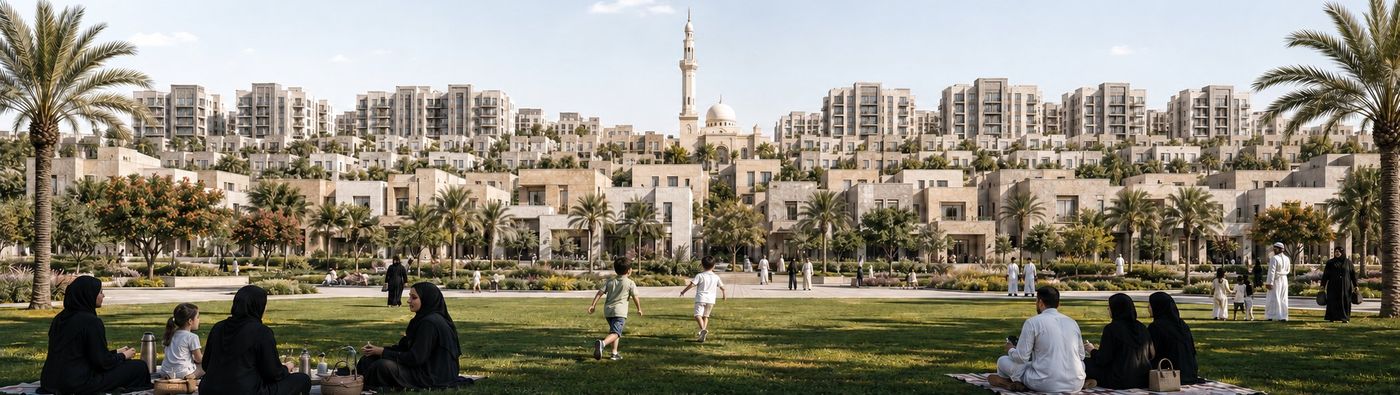
Oasis Jeddah District — Park Edge Panorama
01 District Panorama

Park Edge Panorama

The district read at a glance — a graded height transition from low-rise frontage up to the surrounding skyline, with a continuous park edge as the central civic open space and a landmark minaret anchoring the horizon.
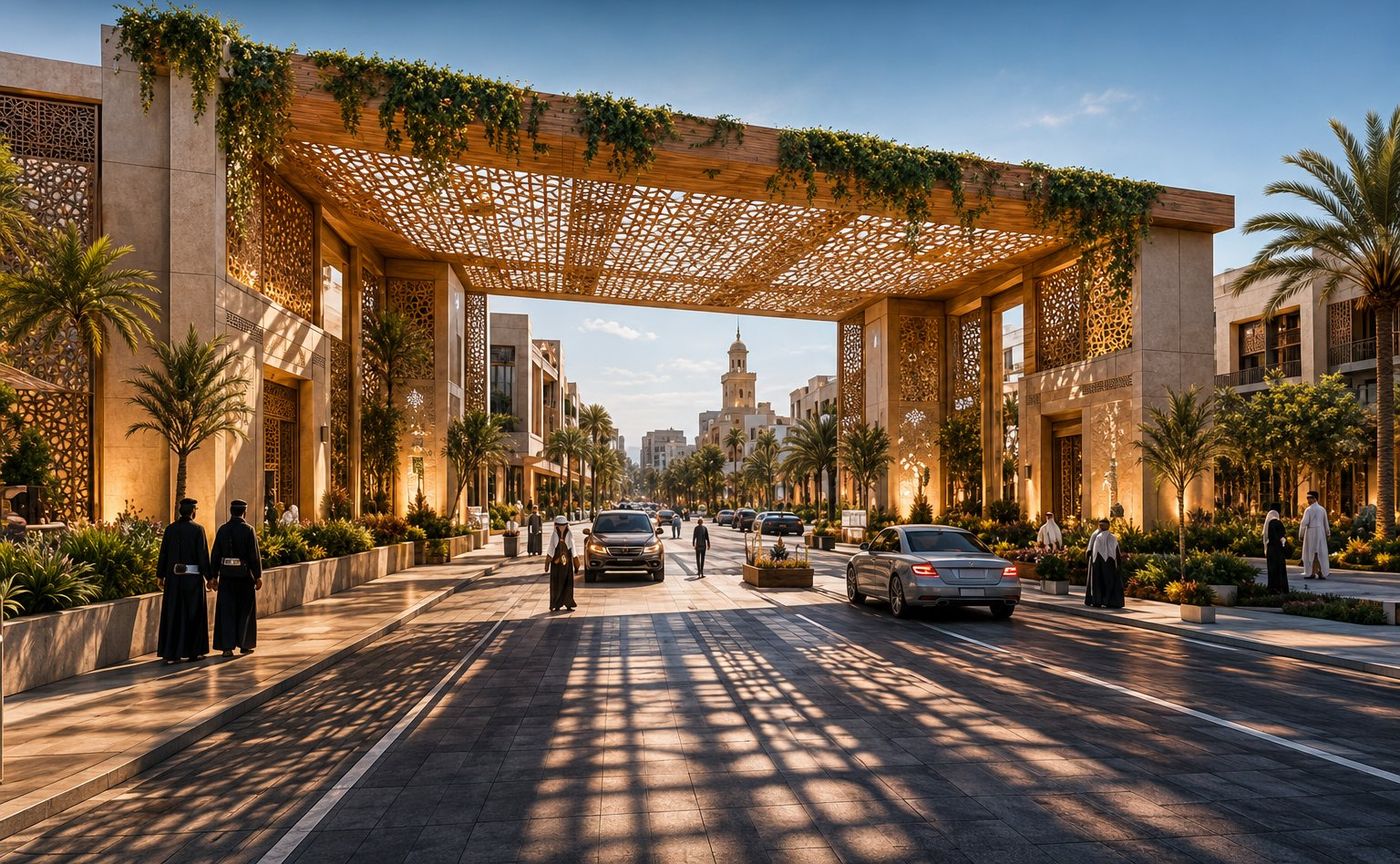
Oasis Jeddah District — Neighbourhood Gateway
02 Arrival Experience

Neighbourhood Gateway

A shaded mashrabiya gateway frames the entry sequence — patterned timber screens, palms and warm uplighting that establish identity and slow movement at the threshold into the district.
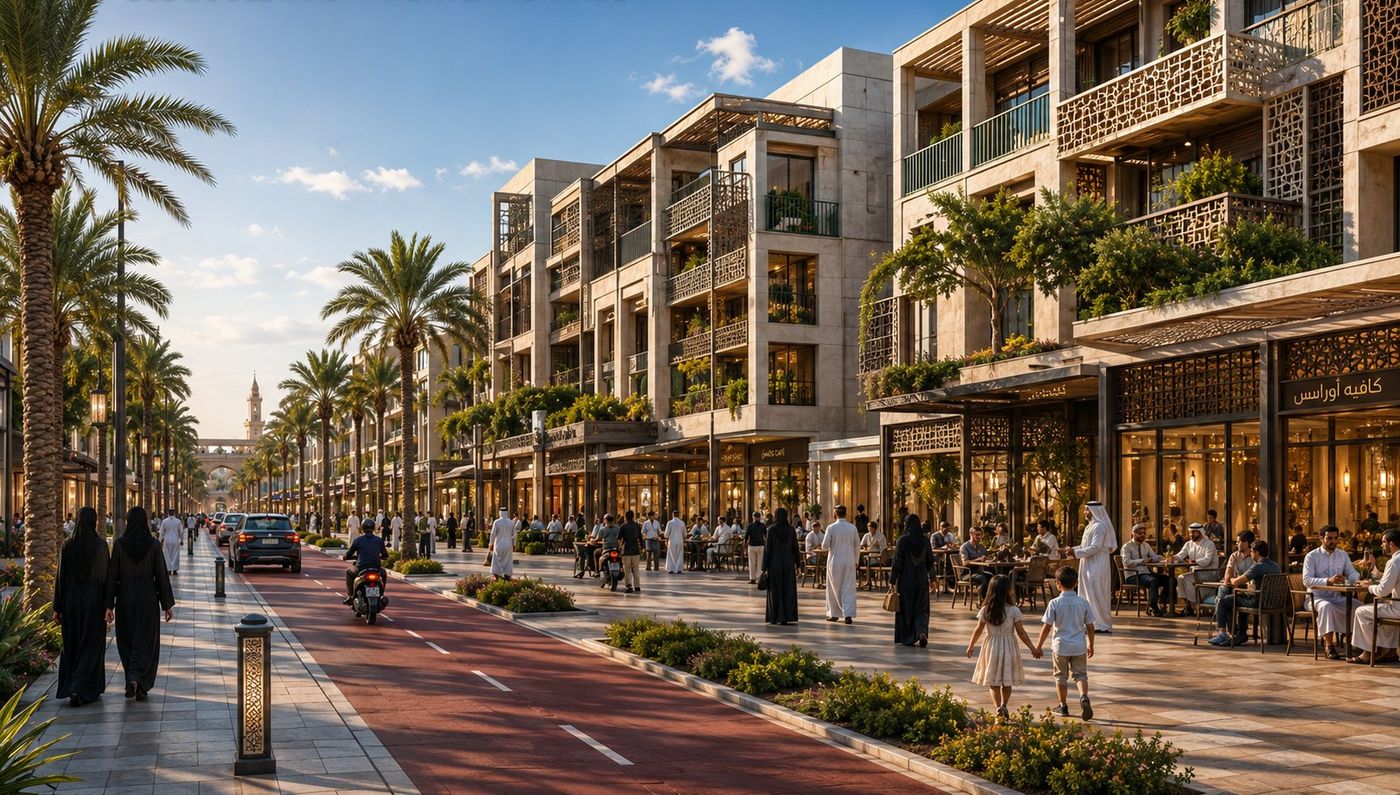
Oasis Jeddah District — Mixed-Use Boulevard
03 Active Frontage

Mixed-Use Boulevard

The district's main spine — continuous active ground-floor frontage, palm-lined walks and a dedicated cycle track delivering animated, walkable street life from morning café to evening promenade.
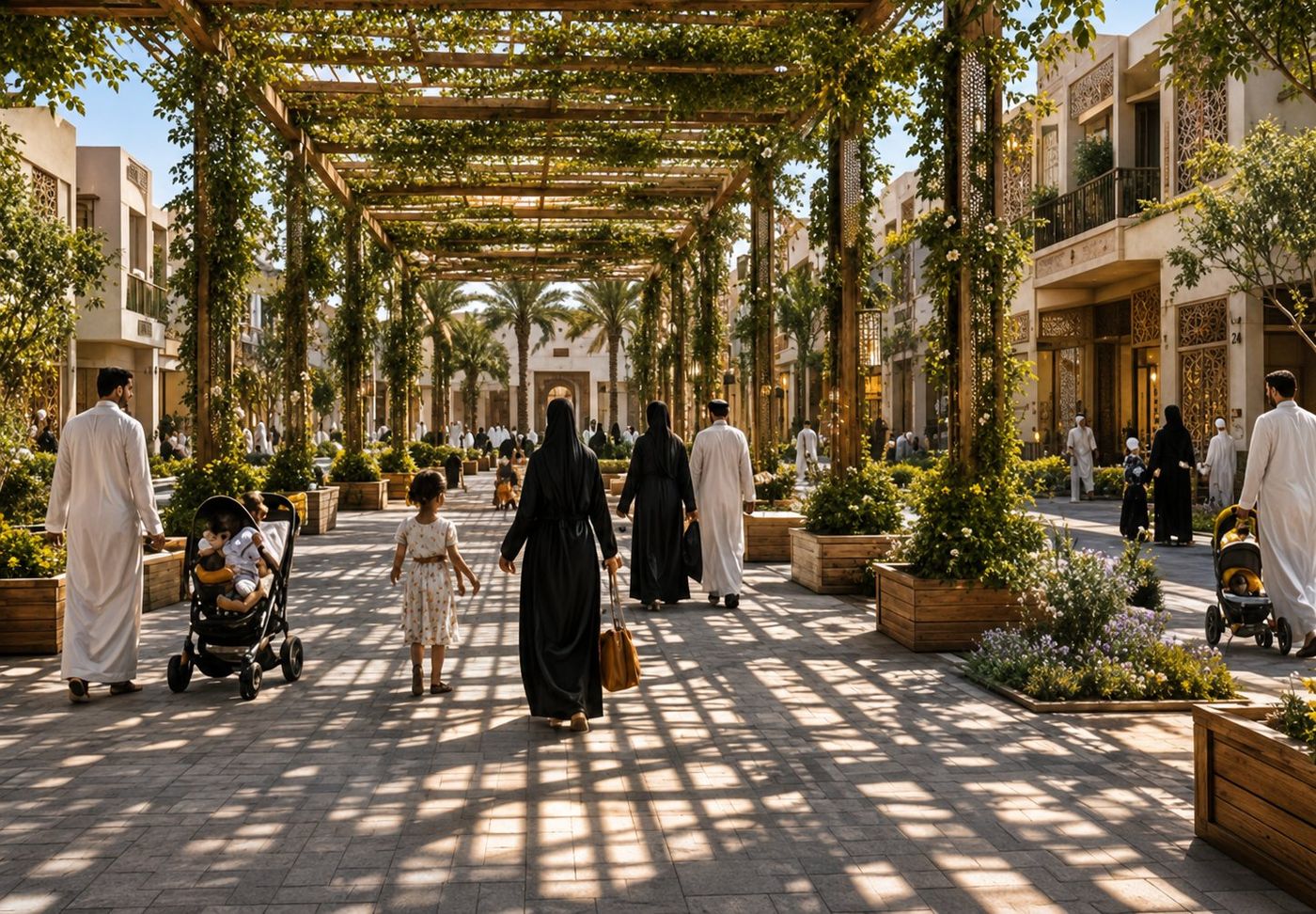
Oasis Jeddah District — Shaded Pedestrian Street
04 Pedestrian Realm

Shaded Pedestrian Street

A pergola-shaded pedestrian street threaded with climbing greenery and planting beds — a cool, family-first ground plane that puts people before cars and reinterprets Hijazi shading for everyday public life.
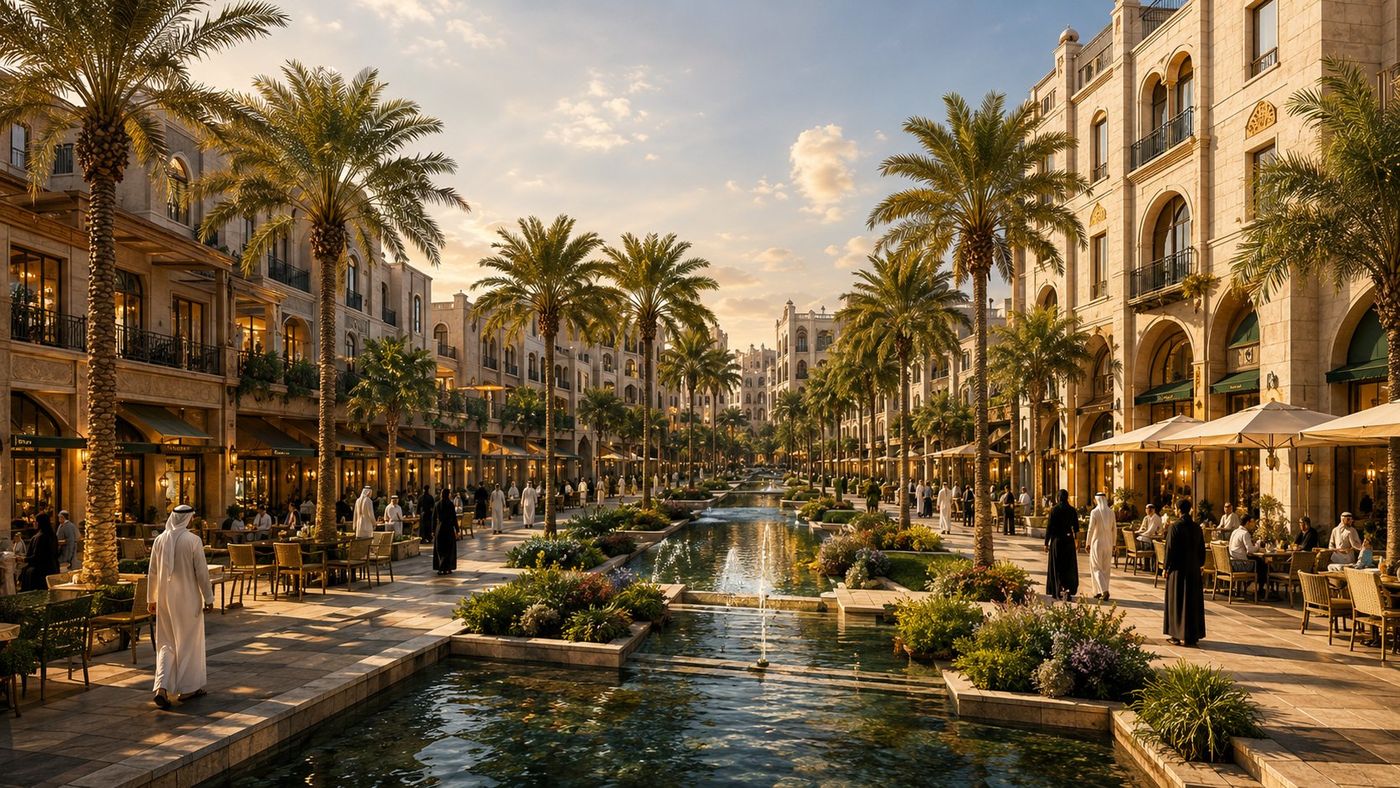
Oasis Jeddah District — Waterfront Promenade
05 Leisure Destination

Waterfront Promenade

A water-feature promenade at golden hour — a linear canal, fountains and shaded café terraces forming the district's social and leisure heart, water-sensitive and microclimate-cooled.
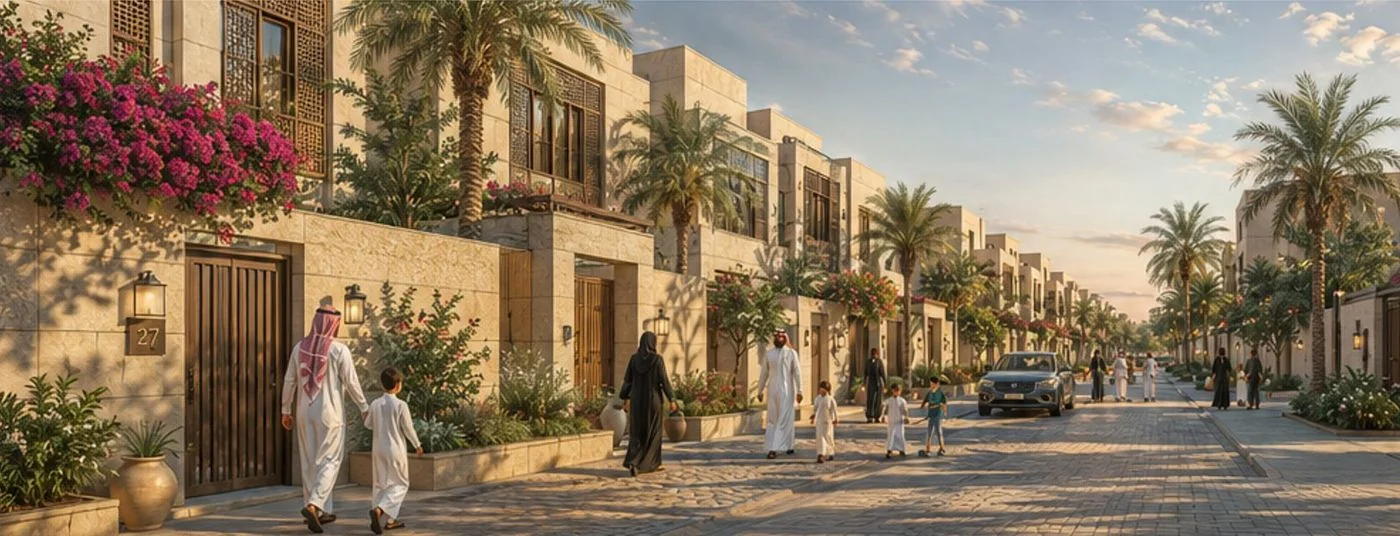
Oasis Jeddah District — Low-Rise Garden Edge
06 Human Scale

Low-Rise Garden Edge

The quiet low-rise edge at dusk — intimate planted streets with bougainvillea, lantern lighting and a fine pedestrian grain that completes the transition from the park core to the district perimeter.

Click any board to view full size →
System Purpose

What This System Does

Generate Saudi and Gulf public realm and open space planning packages combining the full spectrum of intelligence required for competition-grade output — from site reading to completion.

🗺️
Site Intelligence
Site reading, constraint mapping, solar and wind analysis, access hierarchy and infrastructure context.
🌳
Open-Space Program Logic
Parks, plazas, promenades, gardens, play, events, waterfront and ecological typology selection, with capacity planning and program-mix calibration.
📚
Saudi / Gulf Knowledge Base
Building codes, municipal standards, climate data and regional public realm, landscape, waterfront and recreation precedents — referenced live across every design stage.
🕌
Saudi / Gulf Cultural Rules
Privacy gradients, civic and cultural rhythm, shaded pedestrian movement, microclimate cooling and multi-generational gathering logic.
📐
Masterplan Intelligence
Street hierarchy, public realm strategy, community anchor positioning, walkability catchments and municipal review and compliance verification.
⚖️
Scenario Scoring
6 public-realm scenario families with KPI-weighted scoring across 8 dimensions — evidence-based recommendation, not visual preference.
🎨
Visualization & Output Briefs
Board composition, render briefs and diagram styling calibrated to each output type — competition panel, technical sheet or massing study.
🏆
35-Stage Modular Workflow
Thirty-five specialized stages using modular inheritance, output-memory control and visualization diversity to prevent repetitive prompts and duplicated deliverables.

User Guide

How to Use UrbanGPT.AI

UrbanGPT.AI generates expert prompts for the AI tools you already use — ChatGPT, Midjourney, Firefly, Leonardo, Flux, or Stable Diffusion. You copy each prompt into your own AI image tool (Midjourney, ChatGPT, Firefly, Stable Diffusion, Leonardo or Flux). Work through the stages in order: each one builds on the last, from site reading to a complete 35-stage public realm and open-space package.

01 Configure your project
02 Upload your site map & write the brief
03 Generate the prompts, stage by stage
04 Compare scenarios & tune the priorities
05 Track everything in the Dashboard
Tip: the more complete and specific your site brief and configuration, the more tailored and non-repetitive every prompt becomes. Tap any step above to expand it.
Premium Access

Choose the right access model

Start with 5 free stages, then unlock the complete 35-stage prompt system for one edition. Studio, team, and institutional options position UrbanGPT.AI as a professional planning workflow rather than a small digital download.

Free Preview
$0

Explore the workflow before purchasing.

  • 5 free stages
  • Sample prompt output
  • Limited board preview
Architecture & Planning Students
Free Access

Free learning access for architecture, planning and urban design students.

  • University email or student ID required
  • Learning / non-commercial use
  • Selected edition access
Team / Academic
Custom

For studios, universities, departments, and public-sector teams.

  • 3–5+ seats
  • Student free-access workflow
  • Training / onboarding option
  • Arabic/English support
FeatureFreeSingle EditionStudio
First 5 stages
Full 35 stages
A0 / A1 boards
Premium outputs
All editions
Future editions
Priority support
Student free accessAvailable for eligible academic users

After checkout, send your Gumroad payment receipt and activation email to WhatsApp Support. We will activate your access within 24 hours after receipt verification.

UrbanGPT.AI Studio

One subscription for the complete UrbanGPT.AI ecosystem: Residential, Retail, Hospitality, Public Realm and CityAI. Designed for consultants, developers, studios, universities and public agencies that need a consistent prompt-intelligence workflow across multiple project types.

Studio License

$1000/year

All current editions, future edition updates, priority support, Arabic/English support and commercial-use prompt workflows.

  • Residential + Retail + Hospitality + Public Realm + CityAI
  • All 35-stage systems
  • Premium presentation workflows
  • Future editions included

Institutional / Academic License

Custom

For universities, departments, municipal teams and professional training programs that need onboarding, bilingual support and dedicated account coordination.

  • Faculty, department and student access options
  • Training / CPD workshop package
  • Arabic and English learning support
Access ModelBest ForIncludedCommercial Goal
Single EditionIndividual planners and designersOne specialized systemEntry subscription
Studio LicenseConsultants and developersAll systems + future editionsHigher annual value
Team LicenseStudios and departments3–5+ seats + shared workflowTeam adoption
InstitutionalUniversities and authoritiesTraining + bilingual support + strategic onboardingStrategic accounts
Trust & Market Fit

Built for Saudi and Gulf urban-development workflows

The platform clarifies that it generates expert prompts for the AI tools users already use, while positioning every output as concept-level planning intelligence that still requires professional verification.

Consultants

Competition entries, master plans, planning studies, concept packages and presentation boards.

Developers

Feasibility narratives, land-use scenarios, investment concepts and stakeholder-ready visuals.

Government Agencies

Vision 2030-aligned workflows, public-realm thinking, mobility scenarios and municipal review preparation.

Universities

Urban design studios, planning education, AI-supported teaching and structured student workflows.

Market Leadership

UrbanGPT.AI Academy + Enterprise

The product can extend into training, certification and enterprise deployment for universities, consultancies, authorities and mega-project teams.

UrbanGPT.AI Academy

Training and certification layer for professional and academic adoption.

  • AI for Urban Planning
  • AI for Master Planning
  • AI for Landscape Architecture
  • AI Competition Boards
  • Certified UrbanGPT Practitioner

UrbanGPT.AI Enterprise

Private knowledge-base and deployment offer for large organizations.

  • Custom standards and prompt libraries
  • Private or controlled deployment
  • Arabic/English enterprise support
  • Team and governance dashboard
  • Authority / mega-project configuration

Step 1 — Your Project

Configure Your Project

Fill in your project details below. Once all fields are complete, each stage unlocks a ⚡ Generate button — click it to produce AI-customized prompts for that stage on demand.

Fill in REQUIRED fields to enable generation
Project Identity
Project Name ★ Required
Project Location ★ Required
Project Type Multi-select · ★ Required
Visitor / Activity Intensity ★ Required
Open-Space Element Types Multi-select · Optional
Leave empty to auto-apply types from your density / project type. When set, these are enforced across Stage 6–35.
Project Scale ★ Required
Site Area Recommended
Target Users Recommended
Design Direction
Design Theme — Character Multi-select · ★ Required
Design Philosophy ★ Required
Landscape & Structures Reference Optional
Climate Context ★ Required
Sustainability Target ★ Required
Cultural / Heritage Cues Recommended
Site Data
Site Location
No location selected — search, click the map, or type coordinates.
Search, click the map, draw the parcel, or type coordinates — the location feeds the prompts. User can screenshot and upload the map manually as the base image.
Site Map ★ Required — Satellite · GIS · Aerial · CAD
Outline the site boundary in red on the map before uploading — the AI preserves it exactly and will not redraw it.
Site Topography Optional
Topography Map Optional — Contour · DEM · GIS
Surrounding Context Recommended
Site Brief ★ Required
What to include in the brief
This text guides the analysis and design of every board, so describe the real site. Aim to cover:
  • Location & surroundings — what borders the site (roads, rail, water, existing neighbourhoods, open land)
  • Site character — topography, slope, orientation, prevailing wind, views, flood/sabkha or other constraints
  • Figures — site area, target users, expected peak capacity, key activity zones, event requirements and operational assumptions (these also drive the planning numbers)
  • Features to preserve — existing trees/groves, heritage elements, landmarks, water features
  • Planning goals — what the project must achieve (e.g. walkable, shaded, family-friendly, inclusive, event-ready, ecologically resilient, phased delivery)
  • Special requirements — any client, regulatory or cultural conditions the design must respect
Example: “Canal-front public realm destination for 12,000 daily visitors; rail line to the south, flood-prone sabkha edge to the west to remain undeveloped; capture prevailing north wind; preserve the date-palm grove on the north-east corner as a public park.”  (max 1,000 characters)
0 / 1000
Project Programme Optional — feeds area schedules, phasing & compliance
Delivery Model Optional
Relevant Saudi Program / Client Context Optional
Access Model / Publicness Level Optional
Target Daily Users / Peak Capacity Optional
Civic / Cultural Anchors Optional — type & gathering capacity
Child & Family Activity Requirements Optional
Parking Strategy Optional
Output Preferences Optional — affect rendering instructions
Render Style (Image Output) Optional
Presentation Language Optional
Time of Day Optional — unifies CGI render lighting
Color Scheme Optional — overrides default palette
Core Specialization

Public Realm, Open Space & Recreation Planning

Purpose-built for one domain: the full spectrum of Saudi and Gulf open space, parks, recreation, entertainment and waterfront types.

Urban Central Park
🏡 Waterfront Promenade & Corniche
🏘️ Civic Plaza & Public Square
🏠 Linear Greenway & Trail
🏰 Botanical & Display Garden
🏢 Sports & Recreation Park
🏗️ Family & Children's Play Park
🧱 Neighbourhood Pocket Park
🏬 Entertainment & Events District
🌊 Marina & Beachfront Destination
Golf & Leisure Landscape
🏖️ Eco-Tourism & Nature Reserve
🎓 Adventure & Activity Park
🧓 Wellness & Therapeutic Garden
🌿 Ecological Wetland & Habitat Park
♻️ Net-Zero Green Park
🏛️ Heritage & Cultural Landscape
📡 Smart Public Realm District
🚆 Transit Plaza & Mobility Hub
🌾 Agri-Park & Urban Farm
Design Intelligence

Saudi / Gulf Public Realm & Open Space Design Rules

12 non-negotiable principles governing Saudi and Gulf public realm, open-space, recreation, waterfront and entertainment design. Every prompt generated by this system is built on climate comfort, cultural fit, accessibility, activation, ecological resilience and long-term operational feasibility.

🏛️
Regional Architectural Identity
Najdi, Hijazi or Eastern-Province vernacular expressed in massing, materials and ornament. Generic international forms are rejected — the district must read as unmistakably of its place.
🏠
Privacy Gradients
Public → semi-public → private → intimate. Every spatial threshold must be architecturally legible and culturally unambiguous.
🚪
Family Privacy & Visual Comfort
Shaded enclosures, screening and separation give families calm, unobserved zones within active public space. Sightlines are managed so gathering areas feel comfortable without feeling exposed.
🌑
Shaded Pedestrian Movement
100% shade coverage on primary pedestrian routes. No unshaded walking exceeding 20 consecutive metres on any designated path.
🌙
Evening Public Life
Design for 7pm–11pm as the primary social hour. All public spaces must support Gulf evening social rhythms.
🕌
Civic Anchor & Cultural Rhythm
A civic or cultural anchor sits at the spatial and social heart of the open space, with the daily and weekly rhythm of Gulf life — prayer times, evenings, weekends — shaping when and how the realm is used.
🎒
Safe Access to Amenities
Vehicle-free, fully shaded and overlooked routes connect entrances, parking and transit to every amenity. Safe, legible arrival is a non-negotiable Saudi family standard.
🤝
Multi-Generational Social Spaces
Three scales: intimate shaded nook → group gathering court → major destination landscape. Saudi extended-family life demands social space at every level of the open realm.
🌀
Microclimate Cooling Rooms
Correctly proportioned shaded, inward-facing outdoor rooms reduce ambient temperature by 4–8°C through passive microclimate geometry, water and planting.
🌬️
Prevailing-Wind Orientation
Building massing and openings orient to capture cooling breezes and shed the western sun. Passive airflow cuts mechanical cooling load before mechanical systems are considered.
🌿
Native / Adaptive Landscape Systems
Gulf-endemic and adaptive species with 40% less irrigation. Non-native landscape fails within 5 years in Gulf conditions without intensive maintenance.
🚗
Edge Parking & Pedestrian Priority
Parking held at the perimeter — the open-space interior is completely car-free. All vehicle movement is absorbed at the edge, never through the heart of the realm.
Prompt Architecture

35-Stage Workflow with Output-Memory Control

UrbanGPT.AI now separates universal system rules from stage-specific prompts. Global quality, Saudi/Gulf context, visual standards and board formatting are inherited once, while each stage defines only its unique purpose, output family and prohibited overlaps.

🧬
Global Inheritance Layer
Competition quality, Gulf climate logic, Vision 2030 alignment, print standards and graphic DNA are defined once, not repeated in every prompt.
🧠
Stage Module System
Each stage contains only objective, inputs, analytical role, unique deliverables, visualization family and prohibited overlaps.
🎞️
Visualization Diversity Engine
Prevents repeated camera angles, board compositions, render atmospheres, diagram families and visual hierarchy across consecutive stages.
🧩
Output Memory Control
Tracks previously used forms, prompts, overlays, compositions and deliverables so new outputs do not visually echo earlier ones.
🚫
Prohibited Overlap Rules
Each stage explicitly states what it must not produce, preventing site analysis from becoming strategy, and strategy from becoming final design.
📊
Unique Output Families
GIS analysis, climate overlays, networks, KPI dashboards, masterplans, sections, technical systems remain visually distinct.
🔁
AI Design Optimization & Refinement
Stage 32 runs a dedicated AI optimization and refinement pass across shade, walkability, public-realm activation, microclimate and environmental performance.
🏁
35-Stage Delivery Logic
The final five stages add livability, economic feasibility, AI optimization, board generation and cinematic presentation packages.
Generate

35 Design Stages

Complete the project setup above — then generate prompts for any stage on demand.

Present

10 A0 Competition Boards

Generate ten print-ready A0 category boards — one per category — built automatically from your project inputs and your developed design.

Suite

Project Design DNA & Master Plan — locked across all 10 boards

These lock your design identity and layout so all 10 boards read as one coherent project. Defaults are derived from your theme & climate — edit any field to match your finalized design, then Save. Everything here is injected identically into every board prompt.

For identical visuals across boards: these prompts lock the design intent in text. To lock the actual look, generate your master-plan / hero board once, then reuse that image as a visual reference in your AI tool (image prompt / style reference, e.g. Midjourney --sref or --cref, or img2img). Text alone cannot force identical geometry across separate generations.
Trust & Professional Use

Built for consultants, universities, developers, and public agencies

Who this is for

Urban planning, architecture, landscape, real-estate, academic, and public-sector teams that need structured AI prompt packages for early-stage planning and presentation workflows.

What you get

Project setup, 35 staged prompts, Saudi/Gulf contextual rules, output-memory control, visualization guidance, board logic, and premium deliverable sequencing.

What this is not

It is not a substitute for licensed professional review, engineering validation, local permitting, survey data, or formal authority approvals.

Professional disclaimer

Outputs are conceptual and presentation-oriented. Use them as structured design intelligence, then verify dimensions, codes, costs, and compliance with qualified professionals.

Contact

Saudi Urban Intelligence Studio

For project enquiries, custom configurations, or institutional licences.

Site & Framework Findings — Stages 1–5 → shape the concept scenarios

Summarise what Stages 1–5 concluded about the site. Defaults are derived from your climate, density, theme and brief — edit to match your analysis, then Apply. This is injected into the Stage 6 concept prompt as the binding basis for scenario formation, and it re-sorts the concept list so the best-fit options for your site surface first (all stay selectable).

Project memory on

Connect Image AI

Generate board images from your prompts using your own OpenAI key. You control usage and billing — your key stays in this browser only.

The endpoint you deployed (see proxy README). Required.
Required. Used for your own image generations and billed to your OpenAI account. Held in this browser session only — never stored on any server.
Not connected.